This post was written by Caitlin Ervin ’28, Special Collections & University Archives Student Worker
Over Spring Break, I was given the opportunity to work as the Historical Research and Publication Aide on the Aldie Mill ledger scanning project. This project is a collaboration between the Loudoun Museum, UMW Special Collections, UMW Department of Historic Preservation, the Papers of James Monroe, and the James Monroe Museum with the goal of digitally preserving an 1830s ledger from the Aldie grain mill in Loudoun County with ties to James Monroe. The ledger itself is in fragile condition – it contains what appears to be about 10 separate paper notebooks dating from 1830 to 1833, bound altogether with burlap. The spine of the ledger is curved, and the paper contents are in a delicate condition.
I worked under the direction of Angie Kemp, head of UMW Special Collections and Digital Scholarship, as well as with Regan Chancellor, UMW Special Collections Research Coordinator. Our first day with the ledger was hectic, to say the least. As mentioned before, the spine of the ledger was curved, meaning that it needed to be supported somehow before we could begin scanning. We spent the entire first hour testing different materials to find what could be used as makeshift props. Some items were too large (like foam book pillows), and would have created a different background color, and affected the cohesiveness and coloring of the images. Ultimately, we discovered that small artifact boxes and lids could be set up as a row of supports – just the right height for the pages to be in focus, but small enough that they weren’t visible in the images. Issue #1 = solved ✔️
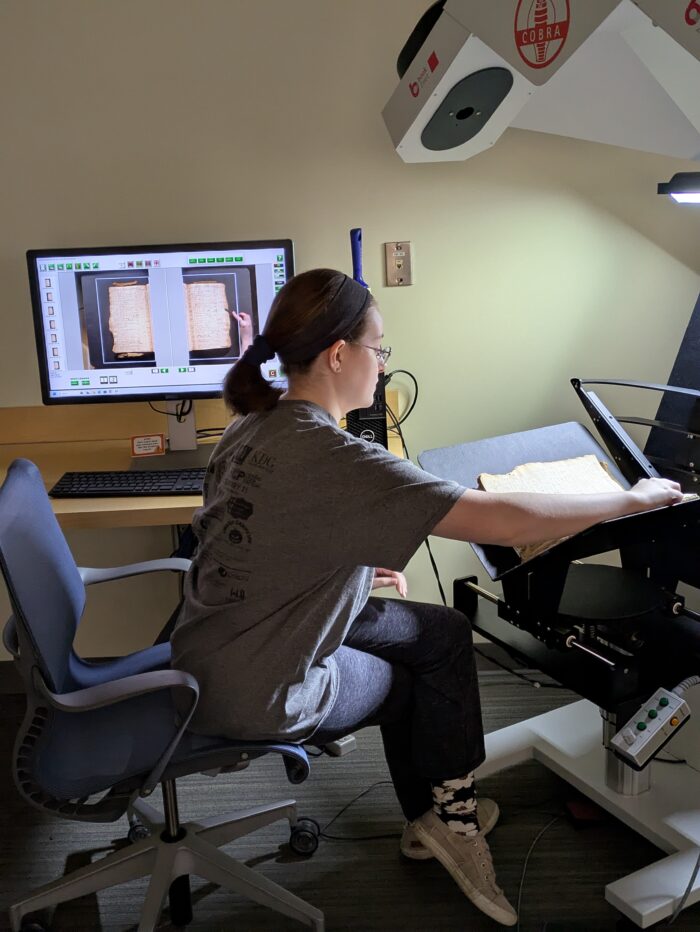
We were then able to begin scanning the ledger using the Digital Archiving Lab’s COBRA scanner. The COBRA takes high-resolution pictures that can be used for any number of purposes, from inter-library loans to long-term digital preservation. The machine has a cradle that prevents spine damage caused by forcing a book to lie flat. Typically, when using the scanner, one would also use an attached glass pane that helps hold the pages still; however, the glass can put additional pressure on the pages and be tricky to center on a curved spine. Because of the condition of the ledger, we decided it would be better to hold pages manually, when needed, with either a small metal spatula or a small bone folder. This better preserved the pages and only came at the expense of occasionally having to crop out a finger or two from a final image. Issue #2 = solved ✔️
After the first two days, we had initial scans of each of the 496 pages of the Aldie Mill ledger. Each of these pages were scanned at a resolution of 600 dpi and stored as TIFF files, which is the preservation standard for image files. Scanning = complete ✔️. Then came processing, which meant a lot of rescanning, renaming, and photoshop. One would think that this would be a linear process. It was not linear. At each level of processing, the images were checked by both Angie and me; and at nearly every level we found something that needed to be addressed. Each change we made also created an updated copy of the images. The majority of the time on this project consisted of a pretty repetitive schedule that resulted in easily a few thousand images that were then stored on a separate hard drive.
Rescans had to be made of between 2 to 90 pages at a time for a variety of reasons: bright spots from the COBRA’s initial light settings, white balance correction, spatula placement, or a piece of paper that shouldn’t be there. Once an image was deemed suitable, it could be digitally processed using Adobe Photoshop or Lightroom.
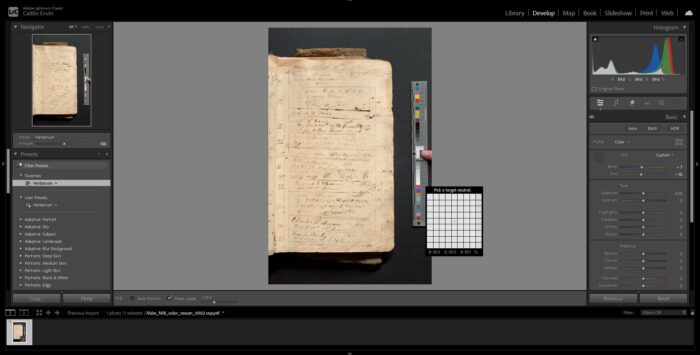
Lightroom Classic was used to adjust the white balance of every page. Due to the lighting conditions in the Digital Archiving Lab, images were appearing with a reddish tint. So, we took additional scans of pages next to a color chart and applied a white balance filter to the remaining pages. This provided images that more accurately represent how the book appears in person. Both versions (white balance and original) were then processed as automated batch actions using Photoshop to create shareable and accessible copies of each image at a lower resolution (300 dpi versus 600 dpi) and as JPEGs, which take much less storage space. There was one day during the Photoshop phase of processing where it took about four hours for all of the image versions to load and save. Many hours of loading later, Image Processing = complete✔️!
Finally: we had completed the scanning. We had done the editing. Surely, we were ready to share our results with the other collaborators, right? No! Now, we had to rename the files. This meant making sure that the different versions and states of editing hadn’t been mixed up, that there weren’t any duplicates in the same folder, and that originals were separated from white balanced, edited versions. Thankfully, we were meticulous in creating and updating folders for each version, so this stage of the project actually went quickly. Final Images = ready ✔️!
Overall, this project was very time-consuming, but also very rewarding: it resulted in the creation of the best possible scans that could be used by the Loudoun Museum, the Papers of James Monroe, and UMW Department of Historic Preservation. Additionally, when reviewing the final images, we were able to identify around a dozen mentions of James Monroe as a customer of the mill, beginning with entries in 1830 until the time around his death in the summer of 1831. My involvement in this project meant that I got to play an active role in preserving a little piece of Virginia history, and I would not have had this opportunity if not for my work with UMW Special Collections and University Archives.
